You no longer need to copy and paste articles manually. When migrating from WordPress or other blog platforms to Shopify, the most challenging part is transferring images. Downloading images manually, re-uploading them to Shopify, and reinserting them into articles consumes an enormous amount of time.
With the Shopify app Blog Importer, you can automatically migrate your articles—including all images—simply by dragging and dropping your XML or CSV files. Essential SEO 301 redirects are also configured automatically.
Log in to the Admin Dashboard
Log in to your WordPress admin dashboard.
[Tools] > [Export]
![[Tools] > [Export]](/img/guide/wp-migrate/ss1.jpg)
Select [Tools] from the left menu, and click on Export under the tools section.
Select [Posts]
Choose [Posts]. This ensures that only your blog posts are targeted for export.
Choose the Export Range
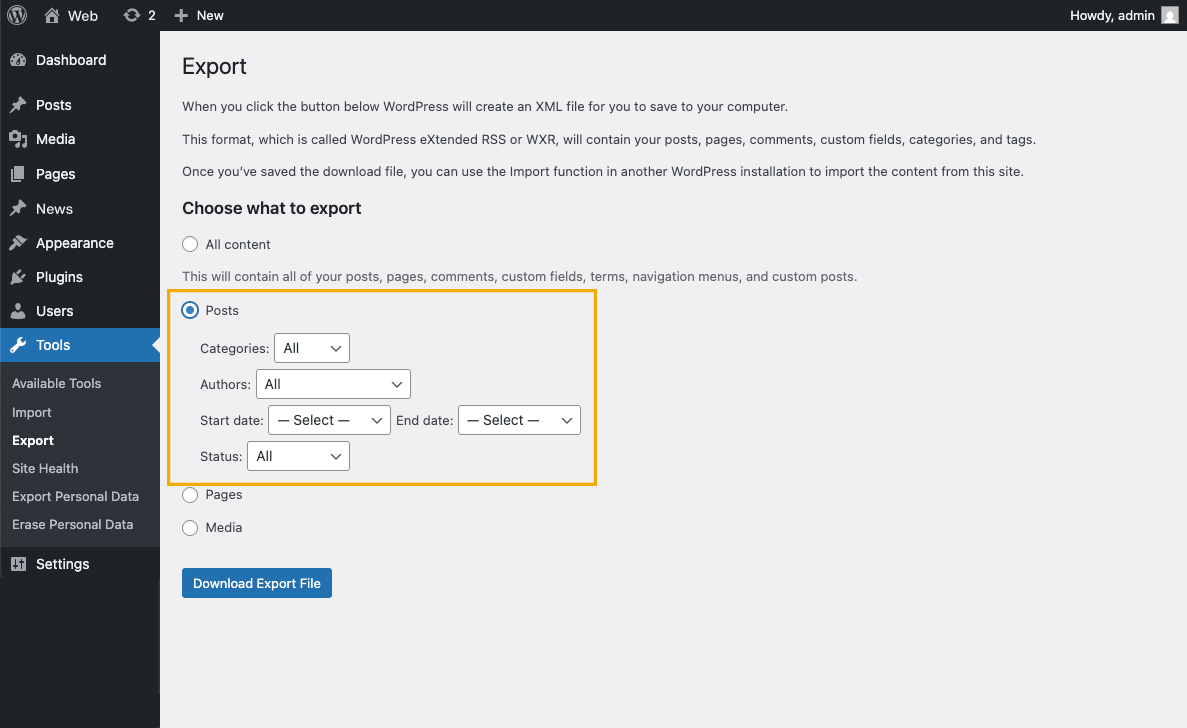
If the file size exceeds 2MB when exporting, please use the free tools below to split it before importing, as the app has a capacity limit.
Additionally, you can use the XML to CSV conversion tool to transform your data into a CSV format. This allows you to edit the content in Google Sheets or similar tools before importing.
XML Splitter
Automatically split large WordPress XML files into smaller pieces.
WordPress XML to CSV
Convert your XML file into a Shopify-ready CSV format for easier handling.
Export the File
Click the export button and download your XML file.
Upload with Blog Importer
Install Blog Importer on your Shopify store and proceed with the import. The process will complete automatically just by dragging and dropping the file into the app.